Every approved TriaCaf run produces a Decision Brief: a short document built to be read two ways. An executive should get the answer from the top third in a few seconds. An analyst should be able to check how that answer was reached without asking for the notebook.
This post walks through the brief in reading order, using the sample brief we publish. The sample was produced by the same renderer that generates every brief in the product; its numbers come from demo data, not a client.
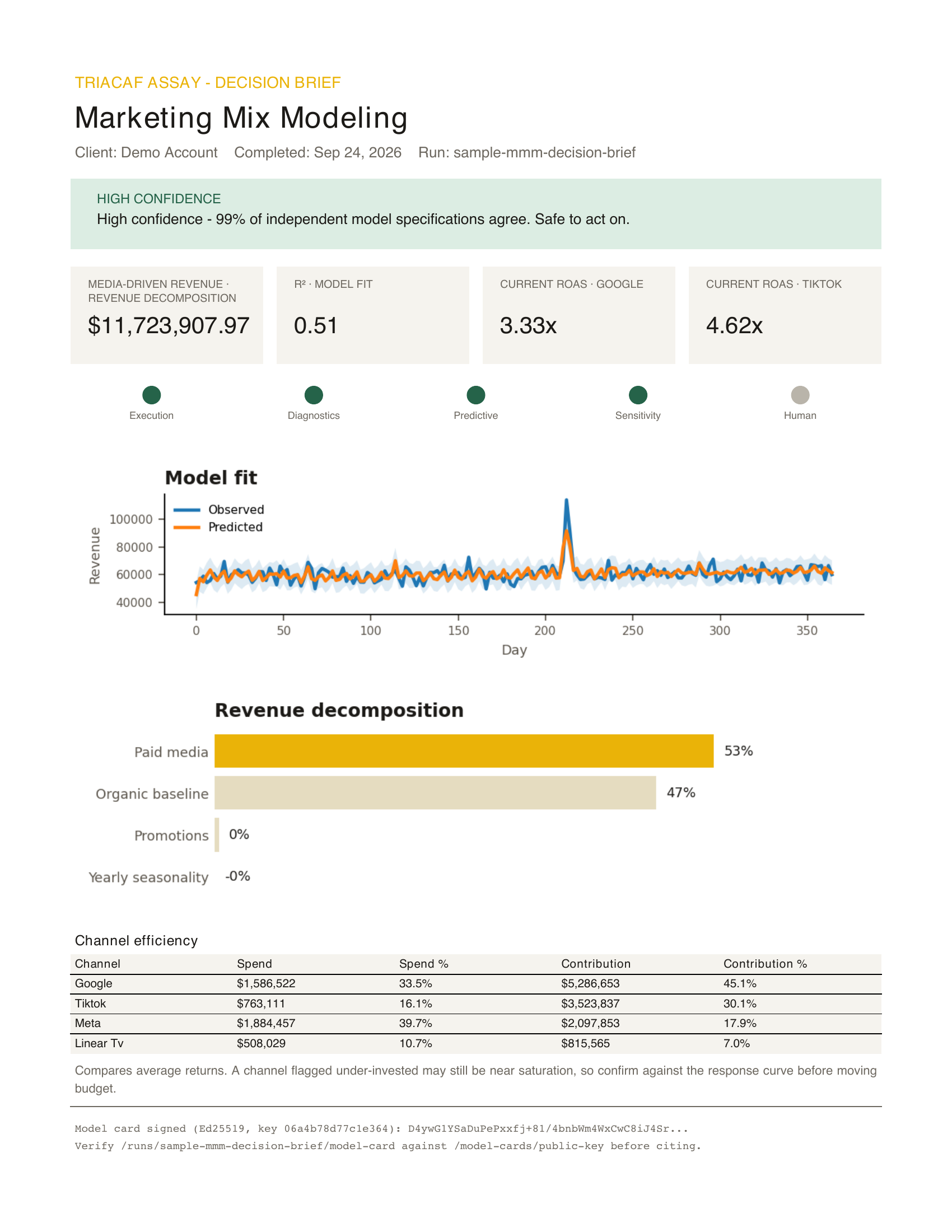
Start with the verdict banner
The banner across the top is the one line to read if you read nothing else. For most packs it comes from how closely the run's model specifications agree with each other: at least 80% agreement is high confidence, 50 to 79% is moderate, and anything lower is low. Where a pack has no agreement score, the banner summarises the verification layers instead. The sentence under it says what to do with that: act on it, review it first, or treat it as provisional.
The wording is generated deterministically from the run's stored results. No language model writes the recommendation, so the brief is exactly as reliable as the run behind it.
Then the metric tiles
Four tiles carry the headline numbers for the pack that ran. Each is a posterior estimate, so where it matters the tile shows a range rather than a single figure. If the same client has an earlier run of the same pack, the tile shows the change since then.
Check the verification strip
Next to the tiles is a traffic light for the five verification layers: execution, diagnostics, predictive, sensitivity and human approval. Green means passed, amber means passed with a warning, and a layer that does not apply to the pack is marked as skipped. A run is only complete once someone approves it, and the strip shows that approval alongside the other four layers.
Read the chart and the table together
The middle of the page is the evidence: the chart that best explains the result for that pack, a breakdown of what drove it, and a table of the underlying numbers. The chart and the table come from the same stored readouts, so they cannot disagree with each other.
Do not skip the caveat
Near the bottom is a caveat, taken from what the model itself flagged during the run: a specification that converged with warnings, a column that was not used, an assumption the pack had to make. If it is there, it is there for a reason.
Page two is for the analyst
The second page is the appendix: every model specification that was fit, their posterior distributions overlaid on one axis, and the reasoning behind the agreement score, including any specification flagged as diverging from the others. It answers the question an analyst will ask first: would a reasonable alternative model have told a different story?
The signature footer
The footer ties the brief to its run and to the run's model card. The model card records the model, its intended use, the data, the specifications, the evaluation, any alerts, the compute cost and known limitations, and it is signed with Ed25519. Anyone with TriaCaf's public key can verify, offline, that the record has not been changed since the run finished.
One page for the decision, one for the proof
That is the whole design: the decision on page one, the proof on page two, and a signature connecting both to a specific run on a specific dataset. Download the sample brief and read it with this post open.